6 min to read
Logic App vs Security Copilot
Bring your SOC next level automation
Introduction: The Automation Dilemma
Today I do judge any organisation having mature SOC (Security Operation Center) not on the basis of Cybersecurity frameworks and Industry standards, I do see what extent they do have SOAR or automation placed, how much is MTTD and MTTR? and till what levels manual intervion is involved?
Since organisations should not have an option when it comes to SOAR , it should be mandatory considering emerging sophiticated threat landscape. They’re constantly asking which tool is right for the job. Should you use a battle-tested orchestrator like Logic Apps? Or embrace the new paradigm of AI-powered Security Copilot Agents?
This is a critical question, and it stems from the powerful, yet distinct, capabilities of each platform. Choosing the wrong tool can lead to brittle, inefficient workflows, while the right combination can dramatically amplify a team’s effectiveness.
So I’m writing down to cut through that noise. I’m going to share the five most impactful truths I’ve learned that have reshaped my own approach. My goal is to give you a clear, strategic framework for deciding when to use Logic Apps, when to deploy an Agent, and, most importantly, how to make them powerful partners in your security architecture.
some clarity before we start

1. The Real Answer Isn’t “Either/Or”—It’s a “Better Together” Architectural Pattern
The first thing I tell my colleagues is to stop thinking of this as a competition. The most powerful automation strategies don’t choose one tool over the other; they use both in a symbiotic partnership. This isn’t just a possibility—it’s the primary architectural pattern for advanced security automation, which I call the “Trigger-Reason-Act” pattern.
A perfect illustration is our automated vulnerability management workflow:
- Trigger (Logic Apps): A Logic App kicks off the process on a daily schedule, pulling the latest published vulnerabilities from CISA. It owns the trigger because its ecosystem can connect to anything.
- Reason (Security Copilot Agents): The Logic App submits this data as a prompt to a Security Copilot Agent. The Agent uses its AI-powered reasoning to analyze the vulnerabilities and correlate them against devices in our environment.
- Act (Logic Apps): The Logic App takes the AI-generated output and performs the final, structured action: creating a high-priority ticket in Jira/ITSM.
This workflow isn’t just a simple handoff; the Logic App provides granular control over the entire process, from parsing the CISA data with a pass JSON step to programmatically calculating and setting a 3-day remediation SLA in the final Jira ticket. This pattern combines the consistent, predictable orchestration of Logic Apps with the advanced reasoning of Security Copilot to achieve a sophisticated outcome that neither could manage alone.
So that’s a partnership that they have but it’s it’s not an either or when you um when you’re thinking about AI versus automation or source solutions
2. You Can Build an AI Security Agent the Same Way You’d Ask a Colleague for Help
One of the most profound shifts brought by Security Copilot Agents is the ability to build custom automation using natural language. This concept, sometimes called “vibe coding,” dramatically lowers the barrier to entry. Instead of writing complex code or navigating a visual builder, you can simply describe your intent.
But this isn’t magic. When you provide a plain-language description like “track unusual remote desktop traffic,” the Security Copilot platform gets to work. It interprets your intent, understands what tools (plugins and skills) are available for the agent to use in your environment, and then helps you craft the agent by mapping your goal to those concrete capabilities.
This approach allows security professionals to translate their operational needs directly into functional automation without needing to be developers. For the first time, we can democratize the creation of custom security tools, enabling teams to build highly specific agents tailored to their unique environments and challenges.
…this really allows you to start from a natural language intent on what your agent should be doing the same way you describe it to a colleague or a friend or a toddler.
3. Logic Apps’ Secret Weapon Is Its Massive Ecosystem
Too often, I see teams pigeonhole Logic Apps as a tool for simple, linear, “if this, then that” tasks. While it excels at those, this view completely overlooks its true power: a vast and mature ecosystem that serves as the connective tissue for the entire enterprise. The platform’s secret weapon is its library of 1,400+ out-of-the-box connectors.
AI agents, for all their intelligence, can be isolated without a powerful integration fabric. This massive collection of connectors is what allows Logic Apps to bridge that gap. It can connect to virtually any service or data source across SaaS, on-premise, and multi-cloud environments. This is what allows AI insights to be actioned across your entire tech stack—from a modern tool like ServiceNow to a legacy on-prem system that an AI model can’t directly access.
Beyond connectors, Logic Apps has surprising depth for developers. A visual data mapper simplifies complex data transformations without custom code, an AI-powered workflow assistant helps accelerate development, and the ability to build your own custom connectors means your integration possibilities are nearly limitless.
4. The Key Decision Framework: Do You Need Consistency or Adaptability?
When I need to decide which tool to use for a specific task, the choice often boils down to a single question: does this workflow require absolute consistency, or does it benefit from dynamic adaptability?
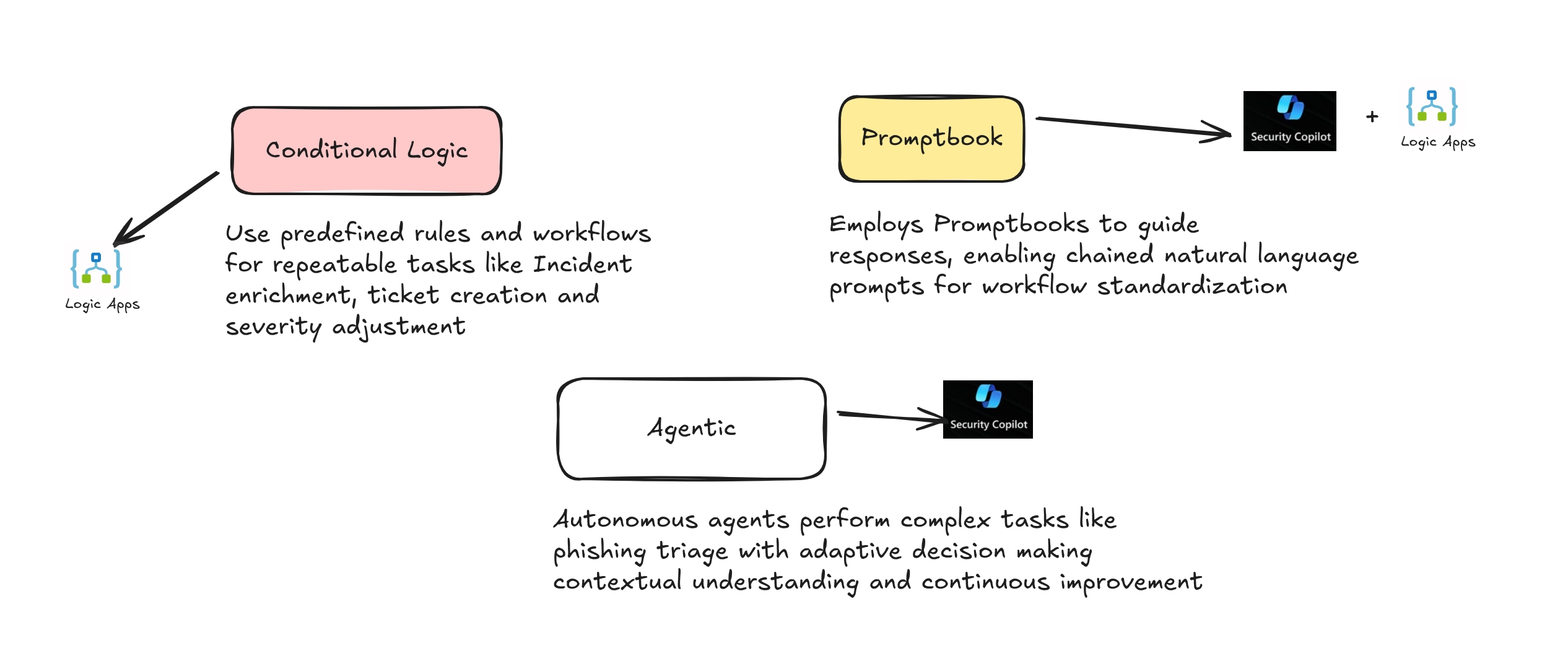
Logic Apps are built for consistency and predictable execution. They are the ideal choice for structured, rule-based workflows that must operate the same way every time. They can be triggered by anything—a web hook, a call from another system, or your on-premise services—and will execute their pre-defined logic flawlessly. Think of tasks like processing alerts based on a fixed set of criteria or automating user offboarding. The workflow is tested and expected to produce a reliable, repeatable outcome.
Security Copilot Agents are designed for adaptability and dynamic reasoning. Their strength is in handling complex tasks where the path to a solution isn’t predetermined. They learn from user feedback and adapt their approach based on the specific context of an incident. Incident enrichment, threat hunting, and complex investigation are prime use cases where an agent’s ability to reason and benefit from variability in its execution is a significant advantage.
…within logicaps you have more that consistency the the execution consistency… Whereas with security co-pilot agents there can be variability and that’s sometimes a good thing and a strong suit.
Conclusion: Automating Smarter, Not Harder
The debate over Logic Apps versus Security Copilot Agents isn’t about crowning a winner. The smarter approach is to understand the core purpose of each tool and leverage their strengths strategically. The future of security operations lies in combining the consistent, wide-reaching orchestration of Logic Apps with the adaptive, context-aware intelligence of AI Agents.
By using the right tool for the right job—and mastering the “Trigger-Reason-Act” pattern when the task demands it—security teams can build truly intelligent systems that augment human expertise and scale their impact.
The question we must now ask ourselves is no longer how to automate, but what we previously considered impossible to automate. With these tools working in concert, that list is getting shorter every day.


Comments