10 min to read
How a Single Photo Can Silently Own Your Mac via ExifTool
CVE-2026-3102
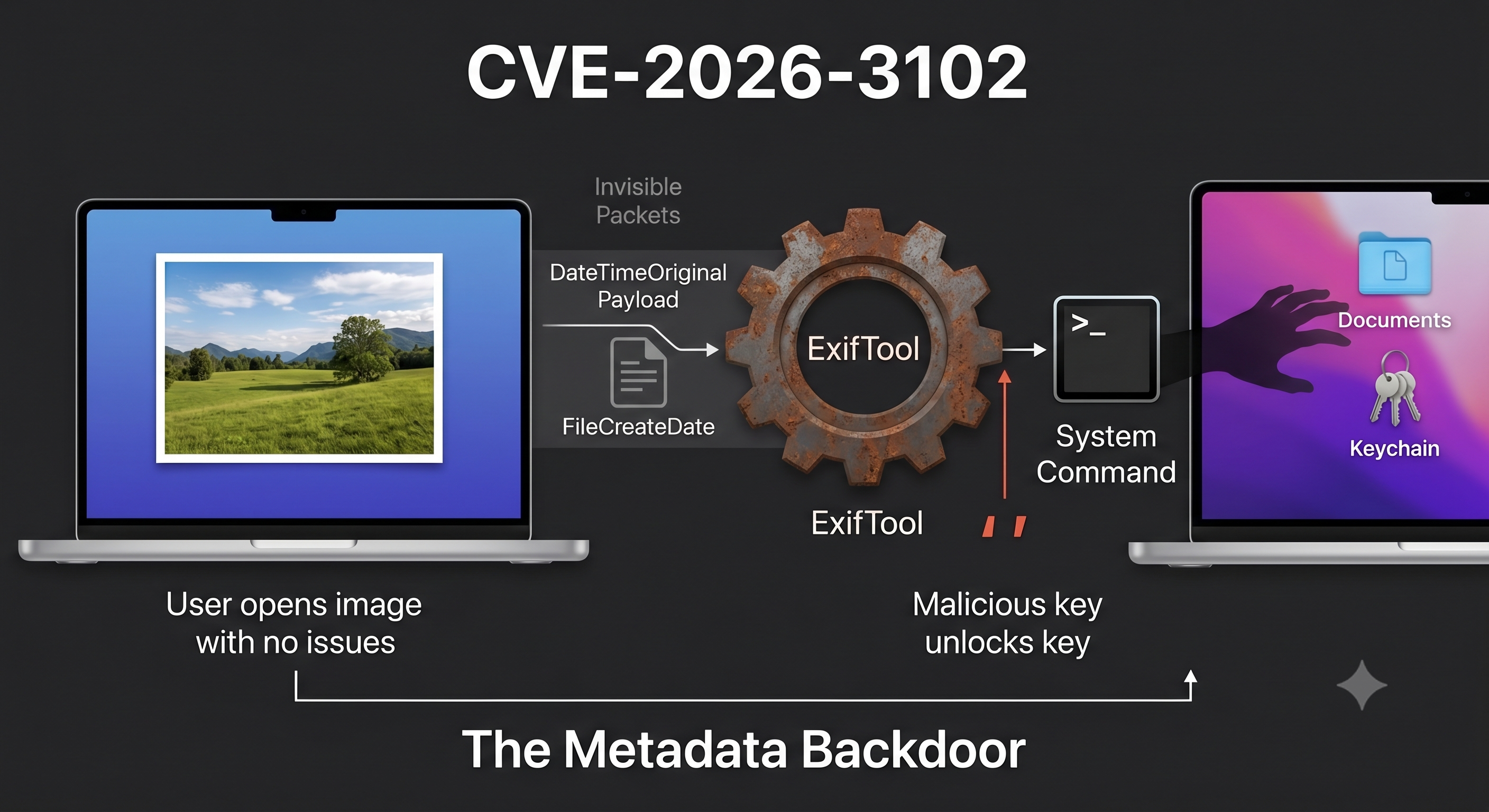
Let me start with a question most people get wrong.
You receive a photo from a client. A photographer sends you their portfolio. A contractor drops an image into Slack. You open it, nothing happens — no weird pop-up, no warning, nothing. Safe, right?
Not necessarily. If the software processing that image is a tool called ExifTool and it’s running an unpatched version on a Mac, that image could have already run commands on your machine before you even saw the picture. That’s CVE-2026-3102. Let’s break down exactly how.
What is ExifTool and who actually uses it
ExifTool is a free, open-source command-line tool written in Perl. Its job is dead simple: read and write metadata inside files.
Metadata is the hidden layer inside almost every file you use. In a photo, it’s things like:
- The exact date and time the shot was taken
- GPS coordinates of where you were standing
- Camera model, aperture, ISO, shutter speed
- Whether the photo was edited and in which software
ExifTool reads and edits all of that. It’s the go-to tool for photographers and digital archivists, and is widely used in data analytics, digital forensics, and investigative journalism. If you’ve ever used a digital asset management platform, a newsroom archival system, or a forensic imaging tool, there’s a solid chance ExifTool was running quietly in the background.
That ubiquity is exactly what makes this vulnerability serious.
What CVE-2026-3102 is, in plain English
CVE-2026-3102 is an ExifTool vulnerability discovered by Kaspersky’s Global Research and Analysis Team (GReAT) in February 2026 and patched by the developers within the same month. Affecting macOS systems with ExifTool version 13.49 and earlier, this flaw could let an attacker run arbitrary commands by hiding instructions inside an image file’s metadata.
Arbitrary commands means anything. Download malware. Steal your files. Open a backdoor. Call home to an attacker’s server. Whatever the attacker wants to run, they run it — with your user’s permissions.
Successful exploitation of CVE-2026-3102 enables an attacker to execute arbitrary shell commands with the privileges of the user invoking ExifTool, potentially leading to full system compromise.
And here’s the thing that trips people up: the image looks completely normal. You can open it in Preview. It renders fine. The malicious payload isn’t visible in the image itself — it’s hidden in the metadata.
The “Macs don’t get hacked” myth, one more time
Can a computer be infected with malware simply by processing a photo — particularly if that computer is a Mac, which many still believe (wrongly) to be inherently resistant to malware? As it turns out, the answer is yes — if you’re using a vulnerable version of ExifTool or one of the many apps built based on it.
This matters because a lot of creative professionals, journalists, forensic analysts, and archivists are on Macs precisely because they believe Macs are safer. They’re not immune. They just have a different attack surface.
How the vulnerability actually works
This is where it gets interesting. Let me walk you through the mechanics without assuming you know Perl or shell scripting.
The date field that became a weapon
When ExifTool processes a file on macOS, it reads a metadata field called FileCreateDate — the date the file was created. On macOS specifically, this field maps to a Spotlight system attribute called MDItemFSCreationDate.
During their analysis, researchers identified a flaw in the SetMacOSTags function. When ExifTool processes file creation dates on macOS, it utilises the Spotlight system attribute MDItemFSCreationDate, which maps to the internal alias FileCreateDate.
To apply this date to the file on disk, ExifTool calls a macOS system command (/usr/bin/setfile) and passes the filename and the date value into that command. Here’s where the flaw lives.
The filename is properly sanitized before being sent to the system. The date value is not. At all.
While the filename parameter is properly escaped before hitting the system() sink, the date value ($val) is left completely unsanitized. This allows an attacker to inject single quotes, breaking the command structure and executing arbitrary shell commands with the privileges of the user running ExifTool.
Think of it like this: imagine you fill in a paper form at a bank. The “Name” field has a human reviewing it carefully. But the “Date of Birth” field just gets fed directly into a machine with no checks. Someone writes 01/01/1990; rm -rf / in the date field, and the machine actually runs the second part.
That’s the essence of command injection.
Why you can’t just type a malicious date directly
You might think: why not just set the FileCreateDate to something malicious? ExifTool will reject it.
Directly writing a malformed date payload into FileCreateDate fails because ExifTool’s built-in PrintConvInv filter detects and rejects invalid date/time formatting.
So the attacker needs to be clever.
The two-step bypass
To bypass this, attackers must use the -n flag, which forces ExifTool to accept raw, unformatted machine-readable data, skipping the sanitization step entirely.
Here’s the actual attack sequence:
Step 1 — Park the payload somewhere ExifTool doesn’t validate:
The attacker writes the malicious command into a different metadata field called DateTimeOriginal. This field doesn’t get validated the same way, so ExifTool accepts it even when it contains shell characters like single quotes.
Step 2 — Copy it into the dangerous field:
The attacker uses ExifTool’s -tagsFromFile feature, which copies metadata from one tag to another. It copies the tainted DateTimeOriginal value into FileCreateDate. Because this is a copy operation (not a direct write), the validation check that would normally catch the bad value doesn’t fire.
Because the vulnerable code path only triggers during a copy operation, not a direct write, this sequence successfully forces the unsanitized input into the system() sink. ExifTool invokes the macOS /usr/bin/setfile command, and the injected single quotes allow the payload to execute seamlessly via command substitution.
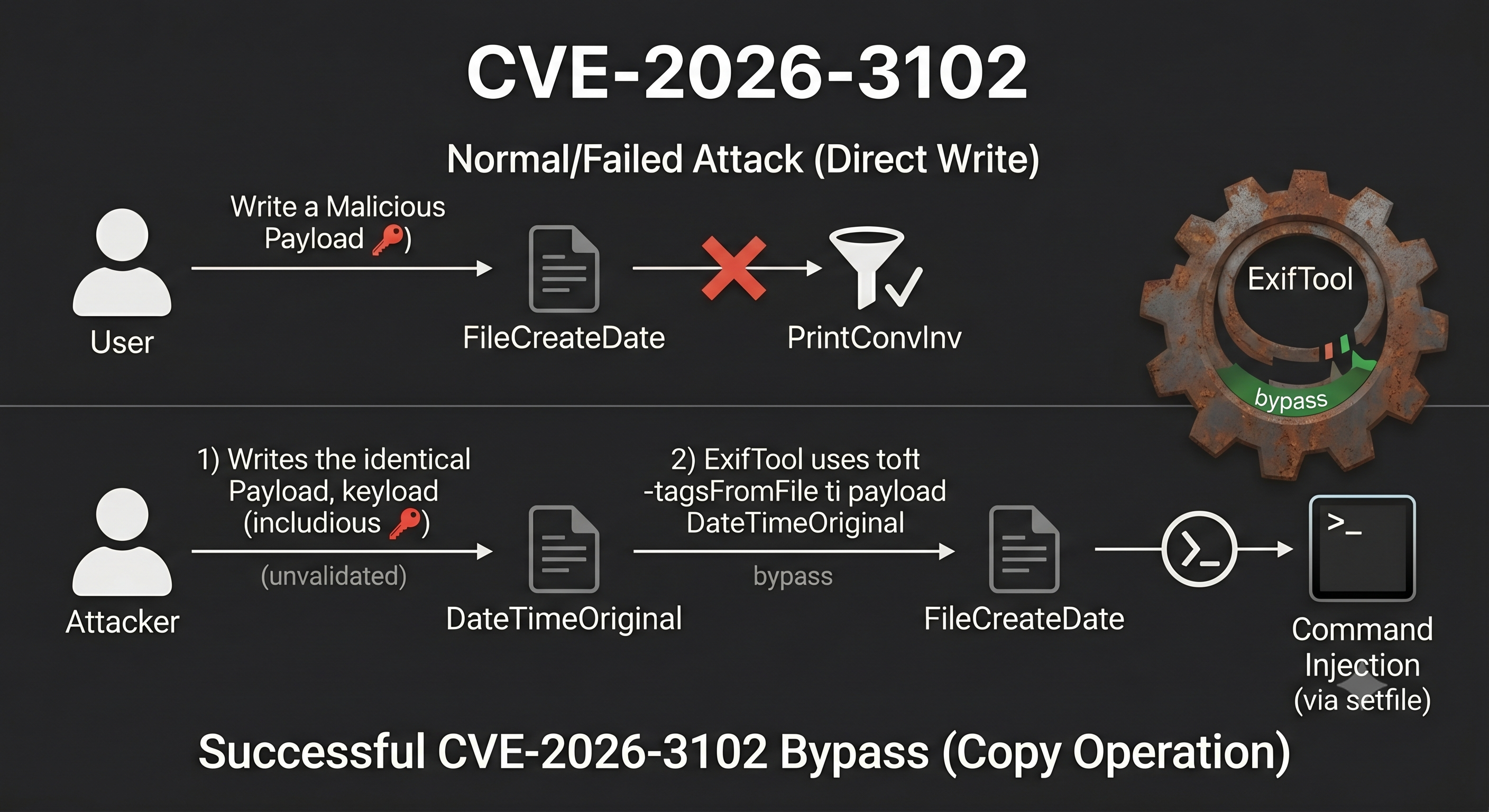
The result: ExifTool runs the attacker’s command as if you typed it yourself in the terminal.
The parallel to CVE-2021-22204
This isn’t the first time ExifTool has had a command injection flaw. This investigation originated from revisiting an n-day vulnerability first examined years ago: CVE-2021-22204. That flaw exploited weak regex-based sanitization before feeding user input into an eval sink. By auditing adjacent input validation routines across the ExifTool codebase for similar oversights, the researcher discovered CVE-2026-3102.
The pattern is the same: user-controlled input reaches a dangerous execution point without being properly cleaned. The lesson hasn’t changed since 2021.
What an attacker does after getting in
Once the command runs, the attacker doesn’t stop at running one instruction. Once executed, attackers can download secondary payloads, infostealers, Trojans, or remote access tools from attacker-controlled servers, silently deploying them on the compromised machine.
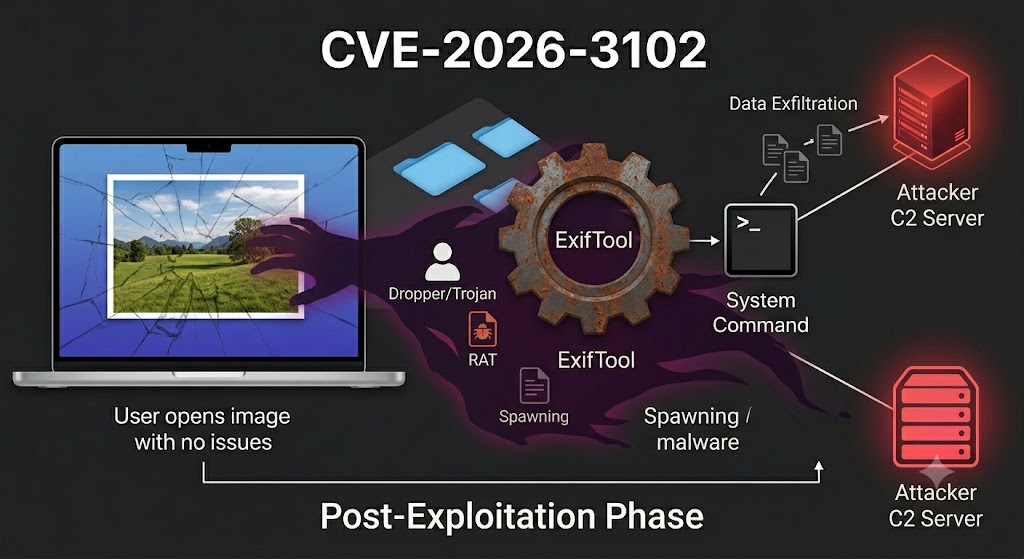
From there:
| Stage | What happens |
|---|---|
| Initial access | Shell command executes when image is processed |
| Persistence | Trojan or backdoor installed to survive reboots |
| Data exfiltration | Credentials, documents, keys sent to attacker server |
| Lateral movement | Attacker uses your machine to reach others on your network |
| Long game | RAT (Remote Access Tool) gives ongoing access |
Bottom line: processing one image from an untrusted source on an unpatched machine is enough to hand an attacker persistent control.
Real scenario: where this actually lands
Scenario: A freelance video editor at a media company receives a folder of stills from a new “client” via WeTransfer. Their Mac mini runs an automated ingestion script that calls ExifTool to extract EXIF data and rename files based on capture date — a perfectly standard newsroom workflow. The attacker has embedded a malicious payload in
DateTimeOriginalon three of the 200 files. The moment the ingestion script runs, a shell command fires, downloads a lightweight infostealer from an attacker-controlled server in Eastern Europe, and begins exfiltrating browser-stored credentials. The editor sees nothing. The images look fine.
This isn’t a contrived edge case. Automated image processing pipelines in newsrooms, creative agencies, and legal discovery workflows are exactly the environments where ExifTool runs without human eyes on each file.
How it was fixed
ExifTool maintainer Phil Harvey promptly released version 13.50 following Kaspersky’s disclosure.
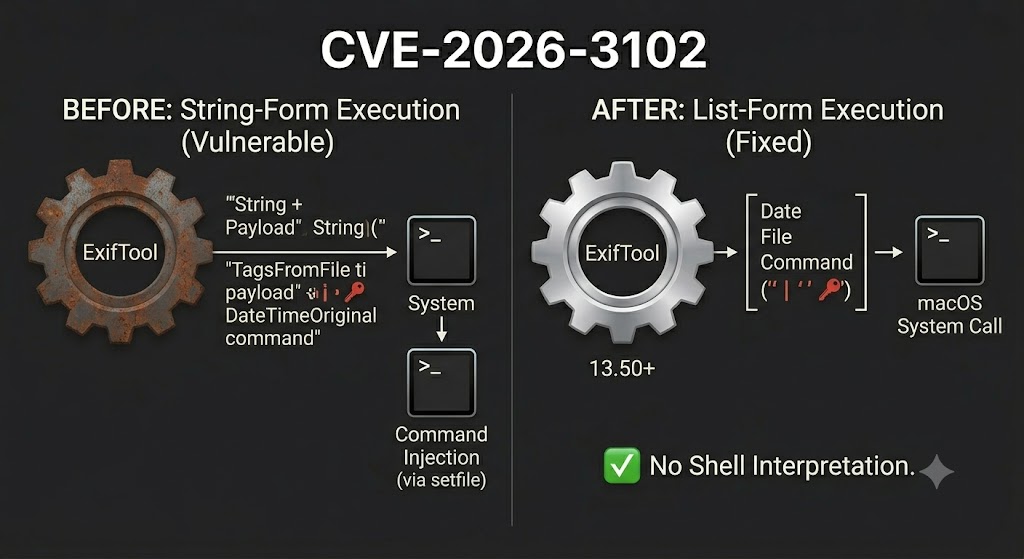
The patch didn’t just add another sanitization check. It redesigned the underlying architecture:
The patch fundamentally alters this architecture by abstracting the system call into a dedicated System() wrapper. Instead of executing a concatenated string, the application now passes a secure list of arguments to the system call. This transition from string-form to list-form execution completely eliminates shell interpretation risks and removes the need for manual escaping routines.
This is the right fix. Sanitization routines can be bypassed — as this very CVE proved. Passing arguments as a list instead of a concatenated string means the shell never gets to interpret injected characters. There’s nothing to escape because the shell isn’t involved.
What you need to check right now
# Check your installed ExifTool version
exiftool -ver

# Output should be 13.50 or higher.
# If it's 13.49 or lower, you're affected.
# macOS — update via Homebrew if that's how you installed it
brew upgrade exiftool

# Or download directly from Phil Harvey's site
# https://exiftool.org
# If ExifTool is embedded in another app (Lightroom plugins, DAM software, etc.)
# check the vendor's update notes — the library version matters, not just the app version
find /Applications -name "exiftool" 2>/dev/null
Additionally, audit automated workflows and scripts that call ExifTool to confirm they reference the patched version. Organisations that rely on open-source components in their workflows can use Kaspersky’s Open Source Software Threats Data Feed to continuously track vulnerabilities across their software supply chain.
Mitigation quick reference
| Action | Why it matters |
|---|---|
| Update ExifTool to 13.50+ | Eliminates the vulnerable code path |
| Audit scripts that auto-process images | The attack targets pipelines, not humans clicking |
| Scan apps bundling ExifTool library | Embedded versions don’t get updated automatically |
| Isolate image processing in a VM or container | If the exploit fires, blast radius is contained |
| Enforce endpoint protection on BYOD Macs | BYOD Macs run unmanaged workflows all the time |
One rule that covers most of this: never run ExifTool against untrusted files on a machine with access to anything you’d care about losing.
The broader point
CVE-2026-3102 is a command injection in a metadata parser. It’s not exotic. It’s not nation-state tradecraft. It’s the same class of bug that’s been showing up in open-source tools for decades — user input reaching a system call without sanitization.
CVE-2026-3102 highlights the risks of inconsistent input sanitization in tools that bridge high-level metadata parsing with platform-specific utilities.
The surface area here isn’t just your terminal. It’s every app, script, plugin, and pipeline that ships ExifTool as a dependency — often silently, often without version pinning, often without update mechanisms. If you’re building or auditing a product that processes user-uploaded images on macOS, this is your supply chain.
Check your version. Update the library. Isolate the pipeline.
References:
- Kaspersky Securelist: How a single image takes control of a Mac
- ExifTool changelog: version 13.50 release
- CVE record: CVE-2026-3102
- Related: CVE-2021-22204 (ExifTool eval injection, same tool, same pattern)
Work with me
Got a security challenge, architecture review, or just want to talk through something? Book a free 30-min call.

Comments