11 min to read
How microVM Isolation Actually Secures your Autonomous Agents
Ft. Docker AI Sandboxes
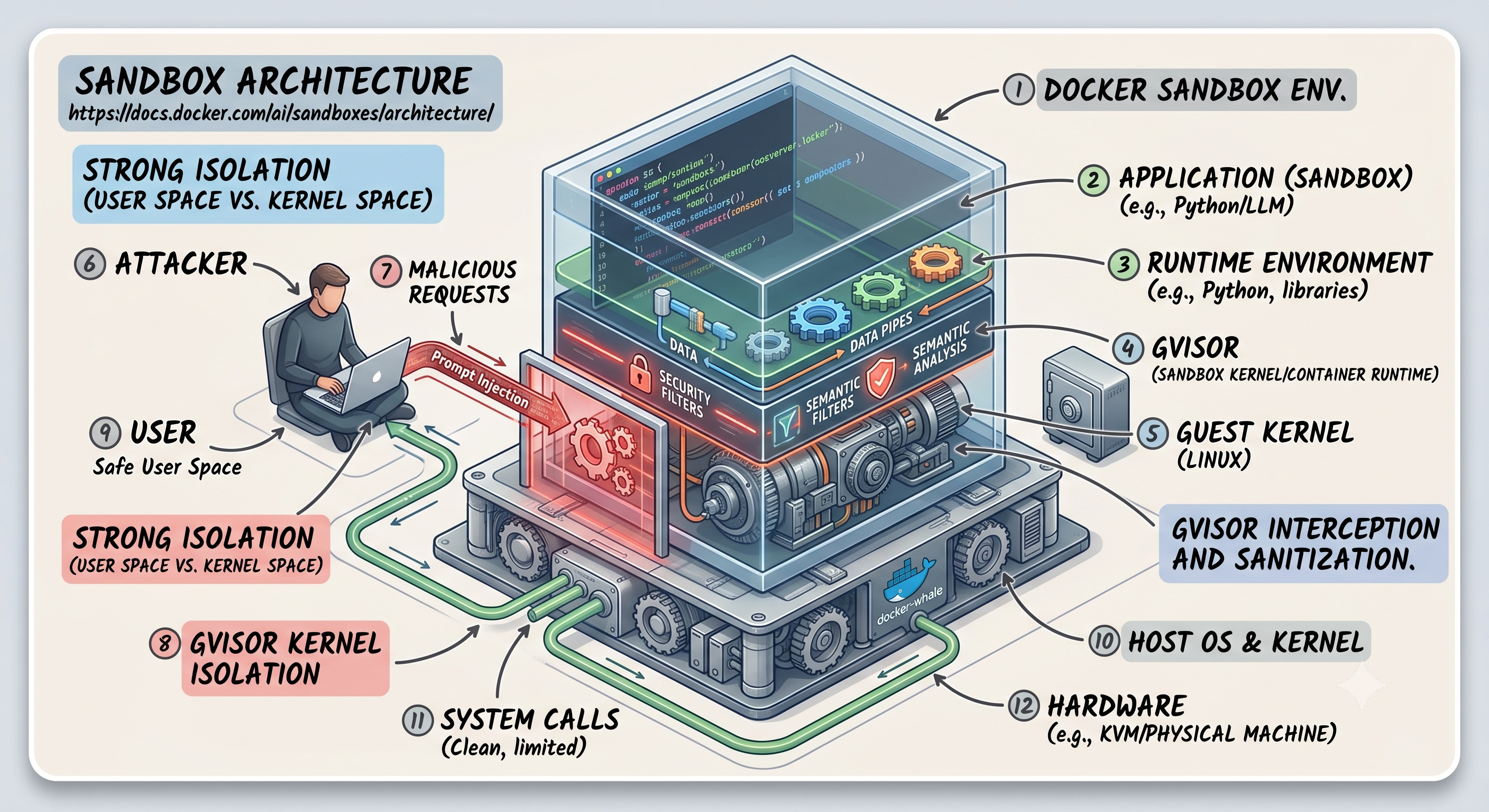
Let me start with simple question, why do we actually need isolated environment for our agent? It’s already belongs to my secure infra, or it’s local on my system? If I ask same question differently
Docker AI Sandboxes Architecture: How microVM Isolation Actually Works for Autonomous Agents
When someone hands an AI coding agent the keys to your repository and says “go fix the CI pipeline,” the question that should follow immediately is: what exactly can that agent touch on your host? Docker Sandboxes gives you an answer to that question backed by hypervisor-level isolation rather than namespace tricks. This post breaks down the actual architecture, maps it to the scenarios where it matters, and explains where the boundaries are.
The Problem with Giving an AI Agent Docker Access
The common pattern when running agents locally is to mount the Docker socket into a container. It works. And it’s also one of the fastest ways to give an autonomous process full control over your host Docker daemon. A container with /var/run/docker.sock mounted can:
- Stop, start, or delete any container on the host
- Pull images and run them with
--privileged - Mount the host filesystem into a new container and read anything the Docker daemon user can access
If the agent is well-behaved, none of this triggers. But agents that run in loops, install packages, and execute generated code against real infrastructure are not a predictable surface. Namespace-based isolation wasn’t designed for this threat model.
Docker-in-Docker (DinD) is the next common answer. You get a nested daemon, so the agent’s Docker operations stay contained to that daemon’s scope. But DinD typically runs as privileged, and a privileged container with user namespace remapping disabled is effectively a kernel boundary, not an application boundary.
Docker Sandboxes takes a different approach: each agent runs inside a microVM with its own Docker daemon, isolated at the hypervisor layer, with explicit policies governing what can cross the sandbox boundary.
What a Docker Sandbox Actually Is
official architecture documentation, a sandbox is a microVM that runs a full Docker daemon in isolation from your host. When you run sbx run <template>, Docker:
- Initializes a VM with the agent template
- Mounts your workspace into the VM via a filesystem passthrough (virtiofs)
- Starts the agent inside the VM
- Routes all outbound network traffic through a host-side proxy
The agent inside the sandbox sees a Docker daemon, a mounted workspace, and an MCP gateway endpoint. It does not see your host Docker daemon, your host network stack, or any filesystem path outside the mounted workspace.
This is categorically different from the DinD or socket-mount models. The isolation boundary is the hypervisor, not the kernel namespace.
The isolation comparison from official docs
| Approach | Isolation | Docker access | Use case |
|---|---|---|---|
| Sandboxes (microVMs) | Full (hypervisor) | Isolated daemon | Autonomous agents |
| Container with socket mount | Partial (namespaces) | Shared host daemon | Trusted tools |
| Docker-in-Docker | Partial (privileged) | Nested daemon | CI/CD pipelines |
| Host execution | None | Host daemon | Manual development |
Bottom line: if the process you’re running is autonomous and makes decisions without human review in the loop, the socket-mount and DinD models expose too much. The overhead of a VM is the cost of that guarantee.
How Workspace Mounting Works Under the Hood
The workspace passthrough is built on virtiofs. Your local directory is mounted into the sandbox VM at the same absolute path it has on your host. If your project lives at /home/shubham/projects/infra-api, the agent sees it at /home/shubham/projects/infra-api inside the VM.
This path preservation matters more than it sounds. Error messages, compiler output, build artifacts, and configuration files all reference filesystem paths. If the agent generated an error at /home/shubham/projects/infra-api/src/main.go:142 and the path inside the sandbox was /workspace/src/main.go:142, you’d spend time mapping references instead of reading them.
Changes in either direction are instant. There’s no sync process, no rsync loop, no inotify-based file watcher copying diffs. The agent writes a file inside the VM, and that write goes directly through the virtiofs passthrough to your host disk. The agent reads a file, and it reads your actual host file. This is a feature and a consideration: the agent has real write access to your working tree.
Virtiofs caching
Virtiofs caching is enabled by default on all operating systems. File reads from the sandbox VM are cached on the host side. This matters for read-heavy operations like git status on a large repository or recursive directory scans during a build, where round-tripping through the passthrough on every read adds up.
To disable it:
# Opt out of virtiofs caching when creating the sandbox
# Only do this if you have a specific reason — for example, testing tools that
# need to see file state changes made by an external process in real time
DOCKER_SANDBOXES_ENABLE_VIRTIOFS_CACHE=0 sbx run <template>
The docs call out one scenario where you should not use virtiofs-backed workspaces: network-attached storage. If your workspace is on an NFS share, an SMB mount, or a cloud-synced folder (Dropbox, OneDrive), every file read the agent makes goes over that network path. The latency compounds quickly on operations like dependency resolution or file tree analysis.
Networking Architecture: What the Proxy Model Means in Practice
All outbound TCP from the sandbox routes through a proxy on your host. This is not optional and it’s not bypassed by running arbitrary processes inside the VM.
The architecture is split by protocol:
- HTTP and HTTPS: routed through a forward proxy on the host side. The proxy handles credential injection and enforces network access policies.
- Other TCP: forwarded transparently through the host-side proxy. Not sent to an upstream HTTP proxy.
What this means for egress control
If your organization routes all outbound traffic through a corporate proxy, the sandbox respects the same egress path as other applications on your host. The host-side proxy chains to your upstream proxy for destinations that require it, and uses direct routes for destinations that don’t.
From the official docs:
By default, both sandbox traffic and the daemon’s own traffic follow your OS system proxy, so this usually works without any configuration.
The explicit configuration options for deviating from the system proxy (PAC files, SOCKS5, or separate settings for sandbox vs daemon traffic) are marked experimental and subject to change.
The forward proxy is also where credential injection happens. If an agent needs to pull from a private registry or call an authenticated API, you don’t hand credentials directly to the agent. You configure them at the proxy layer, and the proxy injects them on the relevant requests. The agent itself doesn’t hold the credentials.
Scenario: A DevSecOps Team Onboarding AI Agents for Code Remediation
Here’s a situation I see increasingly: a security team wants to run an AI agent that takes SAST findings, generates patches, opens PRs, and runs the test suite. The agent needs to clone repositories, install dependencies, run docker build, and push to a branch.
Without sandbox isolation, you’re faced with a real choice. You can give the agent a long-lived token with broad repo access and run it directly on a build machine, or you can restrict it so heavily that it can’t actually do the work. Neither option is operationally clean.
With Docker Sandboxes, the architecture handles several of these concerns at the infrastructure level:
The agent’s Docker access is scoped to the sandbox daemon. When the agent runs docker build to validate that a patch compiles, it’s building inside the sandbox. It can’t interact with the host’s image cache, running containers, or volumes.
Network egress goes through the host proxy. The security team can apply network access policies at the proxy layer to control what registries, APIs, or external services the agent can reach. If the policy says the agent can only pull from registry.company.internal and push to the internal GitHub Enterprise instance, that’s enforced at a layer the agent can’t override.
The workspace is the scope of the filesystem access. The agent sees the cloned repository at its path. It doesn’t see other repositories, secrets files from other projects, or host-level configuration.
Credentials don’t live in the agent. The proxy handles injection. When the agent pushes to GitHub Enterprise, the proxy injects the token. The agent never has it.
The setup for this scenario looks like:
# Step 1: Create a sandbox for the remediation agent with the project workspace
sbx run code-agent --workspace /home/shubham/projects/infra-api

# Step 2: Inspect what's running inside the sandbox
# The agent gets a separate Docker daemon — you can verify this by listing
# containers from inside vs outside the sandbox
sbx exec <sandbox-name> docker ps

# Step 3: When done, remove the sandbox and all its state
# This deletes the VM, the agent's Docker image cache, installed packages, and agent history
sbx rm <sandbox-name>
Storage and State: What Persists, What Doesn’t
Each sandbox maintains its own state independently:
- Docker daemon state (containers, networks, volumes)
- Image cache and layer store
- Installed packages and build tools
- Agent history and session state
- Workspace changes (which go straight to your host disk)
Multiple sandboxes don’t share images. If sandbox A pulls python:3.12-slim and sandbox B also needs it, both pull it independently. This is the cost of full isolation: the daemon isolation means no shared layer cache.
The one exception documented explicitly is the agent skills store. Supported agents mount the same host-side skills store read-write by default. You can opt out when creating the sandbox if you don’t want state from one agent session influencing another.
Stopping a sandbox (sbx stop) doesn’t delete the VM. The installed tools, pulled images, and package state all survive a stop and restart. This matters for long-running remediation workflows where the agent needs to resume mid-task without rebuilding its environment from scratch.
sbx rm is the full cleanup. It deletes the VM, all containers, all images, and all agent state. If the sandbox was created with --clone, the sandbox-<name> Git remote is also removed from your local repository.
The MCP Gateway: How Agents Access External Services
Agents inside a sandbox connect to external services through a single MCP gateway endpoint on the host side of the boundary. The gateway brokers access to registered MCP servers.
MCP servers themselves can be:
- Remote HTTP endpoints reachable from the host
- Local stdio servers launched on the host (not inside the sandbox VM)
If a local stdio server is packaged as an OCI image, or if you explicitly register a docker command for it, the gateway uses the host’s Docker daemon to run it. The server runs on the host, not inside the sandbox.
Policy enforcement on MCP requests happens at the gateway, not inside the VM. Server registration is checked before the server is stored. Individual tool calls, resource reads, and prompt retrieval requests are checked by the gateway before execution. This means an agent can’t bypass MCP policies by making API calls directly — the gateway intercepts at the MCP protocol layer.
This architecture is relevant for teams building agentic pipelines that call internal services. Your internal ticket system, secrets manager, or deployment API can be registered as an MCP server. The agent calls it through the gateway. Governance lives at the gateway level, not in the agent’s code.
Architecture Quick Reference
| Component | What it is | Where it runs |
|---|---|---|
| Sandbox VM | microVM with an isolated Docker daemon | Your host (hypervisor) |
| Workspace mount | virtiofs passthrough at the same absolute path | Shared between host and VM |
| Network proxy | Forward proxy for HTTP/HTTPS, transparent for other TCP | Host side |
| MCP gateway | Broker for MCP server access, enforces tool call policies | Host side |
| Agent skills store | Shared state for agent capabilities | Host side (mounted read-write) |
sbx run |
Initializes VM, mounts workspace, starts agent | CLI on host |
sbx rm |
Deletes VM and all contents | CLI on host |
Source: Docker Sandboxes Architecture — Docker official documentation
Work with me
Got a security challenge, architecture review, or just want to talk through something? Book a free 30-min call.

Comments